What is Google Gemini in 2026?
Gemini is Google DeepMind's family of multimodal AI models — and as of 2026, finally a true peer to GPT and Claude. The story flipped fast: Gemini went from "embarrassing" in 2023 to "best on multiple dimensions" in 2026. Gemini 3.1 Pro (released February 19, 2026) leads on context window, multimodal capability, and Workspace integration. Google's distribution advantage — Gmail, Docs, Sheets, Drive, Android, Chrome, Search — means Gemini is also the AI most knowledge workers use without choosing it explicitly.
This guide walks the whole product surface: every model, every important integration point, the AI Studio and Vertex API paths for developers, and how to actually get the most out of Gemini if you live in or near the Google ecosystem.
The 2026 Model Lineup
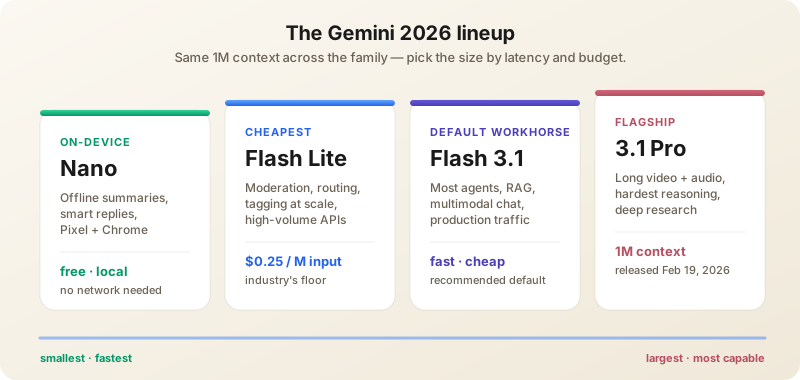
- Gemini 3.1 Pro — Flagship. 1 million token context window — the largest in production. Excellent at complex reasoning, multimodal tasks (text + images + audio + video + PDFs + entire repos), and the most reliable agent loops Google has shipped. Improved scores on complex problem-solving benchmarks; ties or trails Opus 4.7 on the hardest tasks but wins on cost and on anything involving long video or audio.
- Gemini 3.1 Flash — Faster, cheaper, still highly capable. The recommended default for most production work; trades a few accuracy points for a massive cost/latency win.
- Gemini 3.1 Flash Lite — Released March 3, 2026 at $0.25/M input tokens. Optimized for low-latency, high-volume workloads. The cheapest serious model in the industry as of May 2026.
- Nano Banana 2 — Released February 26, 2026. Built on Gemini 3.1 Flash Image. Best-in-class image generation with strong text rendering and instruction following. Available in Gemini, AI Studio, and via the Gemini API.
- Veo 3.1 — Google DeepMind's flagship video model. Native 4K, synchronized audio, lip-sync. Veo 3.1 Lite (May 2026) brings the cost down for high-volume apps. With OpenAI sunsetting Sora, Veo is now the default frontier video model.
- Gemma 4 — Released April 2, 2026. Open-weights model purpose-built for advanced reasoning and agentic workflows. Run locally, self-host, or fine-tune. The strongest open model Google has shipped.
- Gemini Nano — On-device model that runs inside Pixel phones, Android laptops, and Chrome. Powers offline summarization, smart replies, and the local agent loop on Android. Quietly installed onto millions of Chromebooks and Pixels in 2026.
Plans (May 2026)
- Free — Gemini 3.1 Flash via gemini.google.com, integrated in Google products with daily usage limits. Free tier is the most generous in the industry.
- Google AI Pro ($19.99/mo) — Gemini 3.1 Pro with higher limits, deeper Workspace integration, NotebookLM Pro, 2TB Drive, Gemini in Gmail/Docs/Sheets/Meet.
- Google AI Ultra ($249.99/mo) — Highest limits, earliest access, Veo 3.1 video generation (with Veo 3.1 Lite for cost-sensitive workloads), Project Mariner browser agent, 30TB storage, priority capacity.
- Google AI Studio — Free developer console for prototyping with very generous limits. The fastest path from idea to working API call.
- Vertex AI — Enterprise-grade API on Google Cloud with fine-tuning, custom data, SLA, IAM, audit logs, region pinning, and integration with BigQuery and Cloud Run.
What Sets Gemini Apart
1 Million Token Context Window
Still the largest of any major model — matched only by Claude Opus 4.7. In practice this changes what tasks are even possible:
- Drop entire codebases (~30K lines) and ask for cross-file refactors.
- Feed 100+ customer interviews and ask for thematic synthesis with citations.
- Submit full books, multi-document legal contracts, hours of meeting transcripts.
- Work with feature-length video files — Gemini analyzes frame-by-frame and aligns audio.
Most users still underuse this. Don't summarize input — feed the full thing and let the model do the retrieval.
Real Multimodal Understanding
Gemini was built multimodal from the start. It doesn't just describe images — it analyzes audio, processes video frame-by-frame, understands charts, and reads handwritten notes.
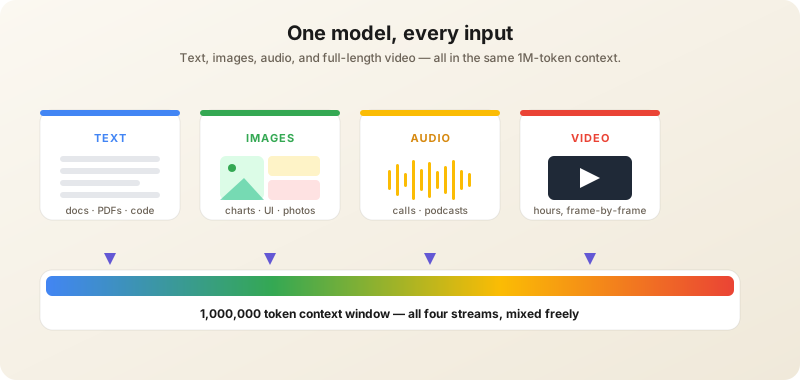
Workflows that benefit:
- "Analyze this 10-minute product demo video and write a feature summary with timestamps."
- "Listen to this customer call and identify the three biggest objections."
- "Read this whiteboard photo and convert it to a structured doc with the action items highlighted."
- "Watch this code-walkthrough video and write the equivalent README."
Native Google Workspace Integration
This remains Gemini's strongest practical advantage. Gemini lives inside the apps where knowledge workers already spend their day. If that workspace is Notion rather than Google’s, the same in-context advantage applies to Notion AI.
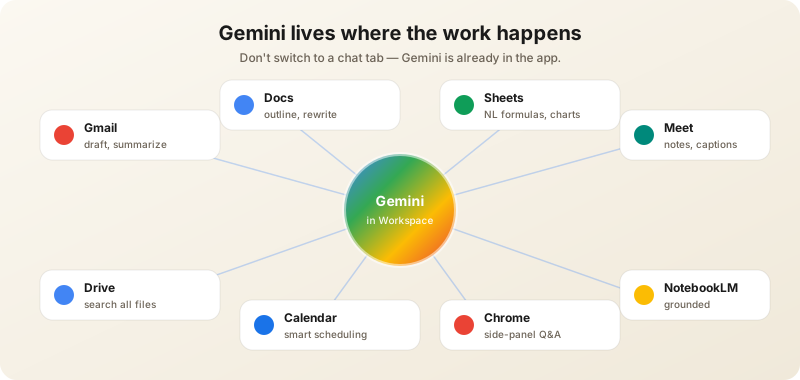
The integrations that matter:
- Gmail — "Help me write" generates drafts that match your tone after a few corrections. "Summarize this thread" works on huge cc-bombed chains. Smart Reply on Android is now powered by Gemini Nano.
- Google Docs — Sidebar generates outlines, rewrites paragraphs, answers questions about long docs. The "@" mention now links other Docs into context.
- Google Sheets — Natural-language formulas ("highlight the bottom 10% of rows by revenue"), auto-analysis, smart fills, chart suggestions. Genuinely changes how non-technical users work with data.
- Google Meet — Real-time captions, post-meeting summaries with action items, "take notes for me". Translation overlays for international calls.
- Google Calendar — Smart scheduling, conflict resolution, agenda prep. "Find a 30-minute window with Sarah next Tuesday morning" works.
- Google Drive — Ask questions across all your files. "What did we decide about Q3 pricing?" returns the answer with a link to the source doc.
Deep Research with MCP Support
Deep Research is Gemini's autonomous research agent. It plans, runs many searches, reads dozens of sources, and produces structured reports. The 2026 additions:
- MCP support — connects to your tools (databases, internal docs, APIs) using the same protocol Anthropic introduced.
- Native visualizations — generates charts and diagrams in reports.
- Long-horizon analytical workflows — multi-stage research tasks across hours, with checkpointing and partial-output preview.
NotebookLM
Technically a separate product, NotebookLM is the most powerful Gemini surface most people haven't tried. Upload a set of sources (PDFs, web links, Drive docs, YouTube videos, audio files); NotebookLM grounds every answer to those sources with inline citations. It refuses to hallucinate beyond what's in your library. Workflows:
- Literature reviews — drop 30 papers, ask for a comparison table, get citations to specific sections.
- Onboarding — upload internal docs; new hires ask the notebook instead of pinging the team.
- Audio Overviews — auto-generated podcast-style summaries of your sources, with two AI hosts walking through the material. Useful for commute listening over your own research.
Gemini on Android & Pixel
Gemini is the default assistant on Pixel 9+ and most Android 16 flagships. The 2026 capabilities:
- Gemini Live — Spoken conversation with the assistant, with the screen and camera as context.
- Circle to Search — Circle anything on screen, get answers. Now backed by Gemini for deeper reasoning.
- Magic Compose / Magic Editor — Smart text suggestions and image edits, mostly on-device thanks to Gemini Nano.
- Pixel Studio & Pixel Screenshots — Image generation and a searchable archive of every screenshot you've ever taken, with Gemini doing the search.
- Gemini Intelligence (Android 17 preview) — Announced May 2026: a deeper system-level agent layer that lets Gemini act across apps with your permission. The Android answer to Apple Intelligence + ChatGPT.
Gemini in Chrome & Search
Gemini now powers AI Overviews in Search, summarizing pages of results into a direct answer with linked sources. In Chrome, a Gemini side panel summarizes pages, drafts emails over the page content, and answers questions about open tabs. Both surfaces use lightweight Gemini Flash models for latency; you can switch to Pro for harder questions.
Building with Gemini
Google AI Studio
The fastest way from idea to working Gemini API call. Visual prompt builder, code export to Python/JS/cURL, a live model picker, and instant token-cost estimates. Free tier limits are generous enough to prototype real products.
Vertex AI
The enterprise path. Same models, Google Cloud control plane. You get IAM, audit logs, region pinning (US, EU, Asia, ME), private endpoints, and tight BigQuery / Cloud Run / Cloud Run Functions integration. Vertex is where you ship Gemini features at company scale.
The Gemini CLI
Released in late 2025 and dramatically improved in 2026, the Gemini CLI gives developers a Claude-Code-style terminal agent backed by Gemini. npm install -g @google/gemini-cli. Run gemini in a repo for an interactive agent that edits files, runs commands, and uses your Workspace context as memory.
Tools, MCP, and Function Calling
Gemini supports standard function calling against JSON schemas, plus MCP servers (Google adopted MCP in early 2026). Wire up Linear, Slack, Postgres, or your own internal tools via MCP and Gemini will call them from Vertex AI, AI Studio, or the Gemini app.
How to Use Gemini Effectively
Lean Hard on the 1M Context
Most people underuse it. Don't summarize input — feed the full thing. Ask Gemini to "find every mention of [X] across these 50 documents" rather than summarizing first. The model is good at needle-in-haystack retrieval.
Use Gemini Where the Work Happens
The standalone gemini.google.com works fine, but the real productivity wins come from in-context use. Don't switch to a chat tab to draft an email — use "Help me write" right in Gmail. Don't paste a CSV into chat — call up Gemini in Sheets.
Multimodal Prompts
Be specific about what you want analyzed. "Describe this image" produces weak output. "Identify all text in this screenshot, list any UI bugs you notice, and suggest 3 specific fixes" gets useful work done.
Build Gems
Gems are Gemini's custom AI experts (like Custom GPTs). Configure once with instructions and reference docs, reuse forever. Examples:
- A "writing coach" gem with your style guide.
- A "research assistant" gem that knows your domain.
- A "code reviewer" gem with your team's conventions.
- A "weekly review" gem fed your goals and habit tracker.
For Coding, Use AI Studio + Gemini CLI
The AI Studio code-execution environment is excellent for prototyping. Generate code, run it inline, iterate. For repo-scale work, the Gemini CLI is now competitive with Claude Code for many tasks — especially anything involving long files where the 1M context is decisive.
For Search-Grounded Work, Always Enable Grounding
In AI Studio and the API, the "Search grounding" toggle lets Gemini cite live Google Search results. Indispensable for current events, prices, and recent research. Off by default in many SDKs — turn it on.
Real-World Workflows
For Workspace-First Teams
- Meeting → action items — Meet records and Gemini drafts the action-item doc into Drive automatically.
- Inbox triage — Smart categorization, draft replies, summarize long threads — all without leaving Gmail.
- Quarterly review prep — Drop the quarter's docs into a NotebookLM notebook; ask for trends, wins, misses.
For Researchers & Analysts
- Long-document synthesis — Drop 30 PDFs into Gemini Pro; ask for a comparison matrix.
- Video and audio review — Gemini is the only major model that handles hour-long videos comfortably. Use it for course transcripts and interview corpora.
- Deep Research reports — Multi-hour autonomous research with structured output and citations.
For Developers
- Cheap classification at scale — Gemini 3.1 Flash Lite at $0.25/M input is the cheapest serious model. Great for moderation, routing, tagging.
- Large-context coding — Cross-repo refactors on the Gemini CLI when context > 200K tokens.
- Multimodal product features — Anything involving images + audio + text together is easier on Gemini than competitors.
For Educators & Students
- Audio Overviews — Turn your course PDFs into a podcast for the commute.
- Tutor mode — Drop your textbook chapter into a Gem; ask for Socratic-style tutoring on confusing sections.
- Whiteboard digitization — Photograph a board, get a clean markdown doc.
Gemini vs Claude vs ChatGPT (May 2026)
Gemini wins on: context window (1M tokens, matched by Opus 4.7), Google ecosystem integration (no contest), video and audio analysis, free-tier value, lowest cost per token at Flash Lite.
Claude wins on: writing quality, careful reasoning, code review, intellectual honesty, the best agentic coding tools (Claude Code).
ChatGPT wins on: agentic computer use, native image generation, plugin/GPT ecosystem, voice mode, mainstream brand familiarity.
Honest take: if you live in Google Workspace, Gemini is likely your best AI. Otherwise, Claude or GPT-5.5 is probably better as a primary, with Gemini AI Pro as a complement for long-document and multimodal tasks. Many professionals subscribe to two.
Privacy & Data Use
By default, Google does not train production Gemini models on Workspace data (Gmail, Drive, Docs). Free-tier gemini.google.com conversations may be reviewed by humans and used to improve models unless you turn off "Gemini Apps Activity" in your account. AI Studio free-tier requests can be used for improvement; Vertex AI requests are not. Enterprise customers get zero-retention agreements, region pinning, and CMEK (customer-managed encryption keys). Read the Workspace + Gemini privacy doc before processing regulated data.
Common Mistakes
- Treating Gemini like a chat tool — its real power is in Workspace context. Use it where the work happens.
- Ignoring multimodal — Gemini is unique in handling video and audio well. Use that strength.
- Not building Gems — five minutes of setup pays back massively over weeks.
- Sticking to Pro when Flash is enough — Flash 3.1 is faster, cheaper, and good enough for most tasks; Flash Lite at $0.25/M input is the new floor.
- Forgetting Search grounding — for current events, ensure Search grounding is enabled in API or Studio.
- Confusing Gemini with NotebookLM — both useful, different purposes. Gemini for general AI, NotebookLM for source-grounded research.
- Not exploring the API tier — AI Studio's free tier is generous enough to prototype real apps before paying.
What to Watch Next
Google's signaled roadmap for the rest of 2026: Gemini 3.5 Pro (rumored late summer), tighter Android Intelligence integration with system-level agents, broader Veo 3.x ecosystem (more languages, longer clips, character continuity), Gemini Live with continuous vision, and continued aggressive pricing on Flash Lite. Distribution is Google's moat — even if Anthropic or OpenAI ships a better model, Gemini will keep winning users who never installed a separate AI app.
Want AI news before everyone else?
The morning's most important AI stories, straight to your inbox. No fluff.