
Cursor IDE Review 2026: Worth $20 a Month?
Cursor Pro is $20 a month and Composer 2.5 now draws with Claude Opus 4.7 on coding benchmarks at roughly a tenth of the per-token cost. But SpaceX is buying Cursor, and that is now part of the decision.
The short version
Get Cursor if
- Professional developers who work in VS Code and want the best autocomplete available
- Anyone doing multi-file refactors regularly — Composer is the category's gold standard
- Developers who want one flat $20 bill rather than a usage meter
Skip it if
- JetBrains, Vim or Xcode users — Cursor is a VS Code fork and does not support them
- Work that is mostly long autonomous runs rather than active editing — Claude Code fits better
- Teams uneasy about SpaceX ownership — the deal closed August 14, 2026, and OpenAI stops serving its models to Cursor on November 12
What we tested
- Cursor Pro with Composer 2.5, reviewed August 2026 after the May hands-on
- Tab autocomplete, Composer multi-file edits, /multitask async subagents and the @-context system in daily use
- Tier pricing as published by Cursor (re-checked September 8, 2026); benchmark figures are the vendors' own published numbers
Pros
- Composer 2.5 draws with Opus 4.7 at ~1/10 the token cost
- Best autocomplete on the market
- Multi-file editing via Composer is unmatched
- Most Composer turns finish in under 30 seconds
- Async subagents parallelize big refactors 3-5x
- Flat $20/mo with no usage meter to budget
- Cursor SDK for building custom agents
- Industry-leading @-reference context system
Cons
- VS Code fork only — no JetBrains or Vim or Xcode
- SpaceX ownership (closed Aug 14) raises model-neutrality questions; OpenAI cuts Cursor off Nov 12
- 500 fast Premium requests run out in a heavy refactor week
- Sometimes hallucinates API signatures
- Free Hobby tier is a trial rather than a plan
- Steeper learning curve than Copilot
The Bottom Line (August 2026)
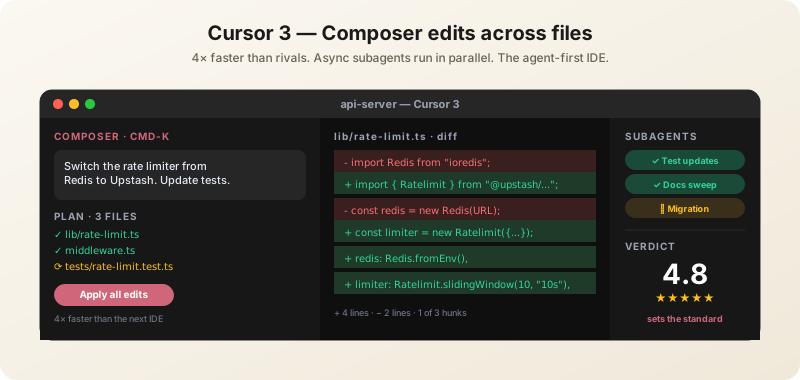
Cursor is the most productive AI coding environment available today, and Pro at $20/month is the clearest value in the category. Composer 2.5, Cursor's own in-house coding model, now benchmarks shoulder-to-shoulder with Claude Opus 4.7 at roughly a tenth of the cost — which means the fastest tool is also the cheapest to run. The Tab autocomplete alone justifies the subscription; Composer is what makes it a category leader.
The one thing that changed since our May review has nothing to do with the product: SpaceX signed a definitive agreement in June to buy Cursor's maker at a $60 billion valuation. That is now a real factor in a purchasing decision, and we cover it below.
Score: 4.8/5 — unchanged. Nothing has come along to beat it.
This is the buying-decision review. If you have already decided and want the how-to — keybindings, context management, workflow patterns — read our complete Cursor guide instead.
Is Cursor Worth $20 a Month?
For anyone who writes code professionally, yes — and it is not a close call. The reasoning is simple: Cursor Pro costs less than one hour of a developer's time per month in most markets, and the Tab autocomplete alone changes how fast you move through routine edits. You do not need to believe anything about agents for the maths to work.
Where it stops being obvious:
- You mostly work in a non-VS Code editor — Cursor is a VS Code fork. If you live in JetBrains, Vim or Xcode, GitHub Copilot supports your editor and Cursor does not.
- You want terminal-first autonomy — Claude Code is built for that shape of work; Cursor is built for active editing.
- You are a hobbyist coding occasionally — the free Hobby tier is a trial, not a plan, but it may be enough.
Cursor Pricing (August 2026)
| Plan | Price | What you get |
|---|---|---|
| Hobby | Free | 2,000 completions/month, limited Premium model access. Effectively a trial. |
| Pro | $20/mo | Unlimited completions, 500 fast Premium requests, Agent mode, Composer. The tier that matters. |
| Teams (Business) | $40/user/mo | Everything in Pro, plus admin controls, privacy by default, SSO. |
| Enterprise | Custom | Self-hosted cloud agents, SOC 2, in-network code execution. |
The honest read on tiers: Hobby is a trial, Pro is the product, Business buys compliance rather than capability, and Enterprise exists for teams that cannot let code leave the network. Most individual developers should be on Pro and stop thinking about it.
What Changed Since Our May Review
Three things, in ascending order of how much they should affect your decision.
Composer 2.5 (May 21, 2026)
Cursor shipped its third-generation in-house coding agent, and the benchmark story is genuinely notable — it draws with Anthropic's flagship:
| Benchmark | Composer 2.5 | Claude Opus 4.7 | GPT-5.5 |
|---|---|---|---|
| SWE-Bench Multilingual | 79.8% | 80.5% | — |
| CursorBench v3.1 (default effort) | 63.2% | 61.6% | 59.2% |
| Terminal tasks | Essentially indistinguishable | ||
Read those numbers carefully, because the headline is not that Composer wins — on SWE-Bench Multilingual it loses by 0.7 points. The headline is that it draws with a frontier model at roughly a tenth of the per-token cost. Cursor is not selling Composer as a general-purpose API; it exists to make the IDE feel instant. But inside that environment, the cost-per-result maths is hard to argue with.
Grok 4.5 Was Trained Alongside Cursor (July 18, 2026)
xAI's Grok 4.5 was trained alongside Cursor, and its pitch is efficiency rather than leaderboard position: it resolves SWE-Bench Pro tasks in about 15,954 output tokens against roughly 67,020 for Claude Opus 4.8, served at 80 tokens per second, priced at $2/$6 per million tokens. It does not top the coding charts — Fable 5 and GPT-5.5 still edge it — but token efficiency at that ratio matters a great deal when an agent is running unattended.
For a Cursor user, the interesting part is the relationship: a frontier lab co-trained a coding model with the IDE you are using. That is the kind of arrangement that produces a tool-specific advantage over time.
The Ownership Change
Covered in its own section below, because it deserves one.
The Ownership Question: SpaceX Is Buying Cursor
On June 16, 2026, SpaceX confirmed a definitive all-stock agreement to acquire Anysphere, the company behind Cursor, at a $60 billion valuation. The deal is routed through a subsidiary so no IPO cash is touched, was set to close in Q3 2026, and carries a $4 billion antitrust break fee. Bloomberg had reported the plan a month earlier.
Update, September 8, 2026: the deal closed on August 14, 2026 — Cursor now sits inside SpaceX's SpaceXAI unit — and on August 30 OpenAI invoked a change-of-control clause and set November 12 as the date it stops serving its models to Cursor. Cursor put OpenAI models at about 5% of its traffic and Anthropic has committed to keep supplying it. At the time of the August review this paragraph said the close had not been confirmed.
What it means if you are deciding whether to standardise a team on Cursor:
- The Grok connection stops looking like a coincidence. Cursor under Musk's umbrella alongside xAI explains a coding model co-trained with the IDE, and points to deeper Grok integration.
- Model neutrality is the risk. Cursor's current strength includes instant switching between frontier models from every lab. An owner with its own frontier model has an incentive to narrow that. Nothing suggests it has happened; it is the thing to watch.
- Enterprise procurement will have questions. A $4 billion antitrust break fee signals the parties expect scrutiny. If your legal team cares who processes your source code, this is now a live topic.
None of this changes the recommendation for an individual developer paying $20 a month. It is material for a team lead signing a multi-year commitment.
What Cursor Does Best
Tab Autocomplete
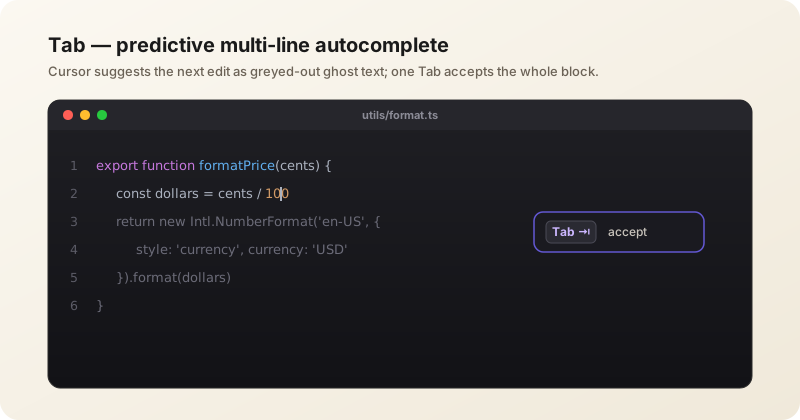
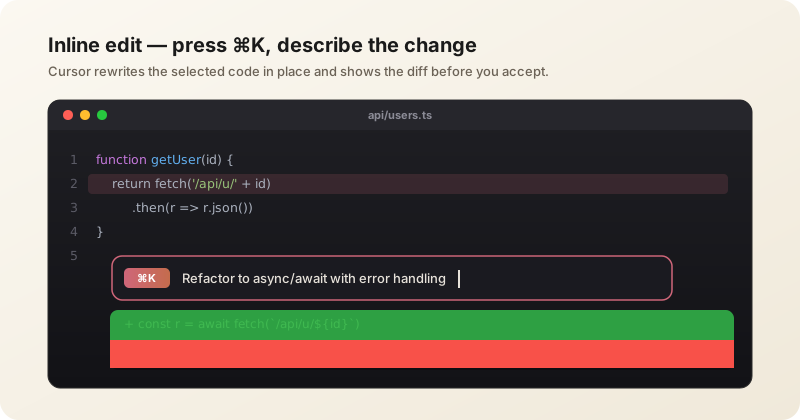
The signature feature and still the best in the category. Multi-line completions that adapt to your codebase's style, accepted with one keystroke. Unlike single-line tools, Cursor's Tab rewrites entire blocks based on what you just changed. If Composer did not exist, the autocomplete alone would still justify the subscription.
Composer (Multi-File Editing)
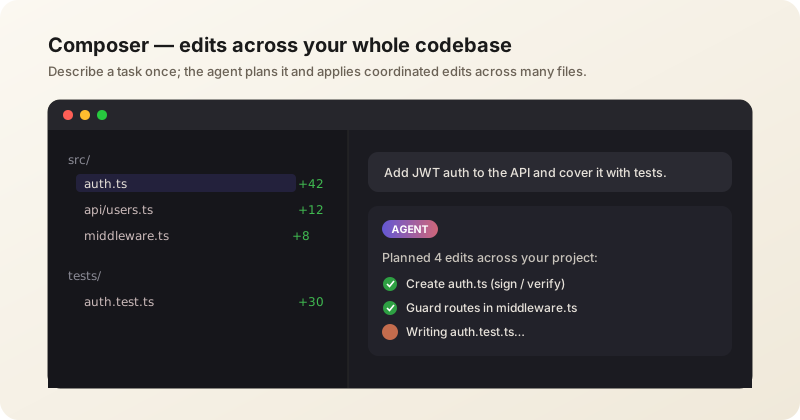
Describe a multi-file task; Composer plans the changes, edits across files, and presents one diff for review. Tasks that work reliably today:
- "Add a /trending API endpoint with Redis caching, update the homepage to display it, write Vitest tests"
- "Migrate from styled-components to Tailwind across all components"
- "Add Google OAuth login: auth context, login button, protected routes"
Most turns finish in under 30 seconds, which is the detail that matters — it is fast enough to stay interactive rather than becoming a job you submit and wait on.
Async Subagents
Use /multitask and Cursor breaks the work into chunks across parallel subagents. On real refactors this runs 3-5x faster than sequential execution.
Cursor SDK
Build custom agents on the same runtime that powers Cursor, in a few lines of TypeScript, running locally or on a dedicated cloud VM. Worth knowing about if you have company-specific workflows to automate.
Context System
Industry-leading context management via @filename, @folder, @docs for live library documentation, @web, @git and @codebase semantic search. Pin files to persist context across messages.
Cursor in Action
Where It Falls Short
VS Code Only
Cursor is a VS Code fork, so it inherits that ecosystem and nothing else. There is no Cursor for JetBrains, Vim or Xcode. This is the single most common reason a developer cannot adopt it, and no amount of model quality fixes it.
Premium Model Limits
500 fast Premium requests a month on Pro runs out faster than expected during a heavy refactor week. Budget for the higher tier if agent work is your default rather than your occasional tool.
Hallucinated APIs
Like every AI coding tool, Cursor sometimes invents API signatures or imports. Verify against @docs; tests catch most of the rest. This is a property of the category, not a Cursor defect.
Learning Curve
The agent-first design is more powerful but takes about a week to internalise. Copilot is simpler on day one. If you are evaluating on a two-day trial, Cursor will lose to Copilot and that comparison will be wrong.
The Free Tier Is Not a Plan
2,000 completions a month with limited Premium access is a trial. Do not evaluate Cursor on Hobby and conclude anything about the product.
Cursor vs Claude Code vs GitHub Copilot
| Cursor Pro | Claude Code | GitHub Copilot | |
|---|---|---|---|
| Shape of work | Active editing in an IDE | Terminal-first autonomous tasks | Inline completion anywhere |
| Wins on | Best autocomplete, multi-file Composer, fastest iteration, instant model switching | Whole-codebase awareness, parallel subagents, long unattended runs | Editor breadth (JetBrains, Vim, Xcode), GitHub and PR integration, enterprise compliance |
| Editor support | VS Code fork only | Terminal, any editor | Broadest of the three |
| Billing | $20/mo flat | Subscription tiers | Metered AI Credits since June 2026 |
These are not really substitutes, and the most common setup among developers we talk to is Cursor plus Claude Code — Cursor for the code you are actively writing, Claude Code for longer autonomous jobs running in parallel. If you are choosing only one and you work in VS Code, choose Cursor. If your editor is not VS Code, the choice is made for you.
Worth knowing if you are comparing on cost: GitHub Copilot moved to metered AI Credits in June 2026, so its bill now scales with how hard you push the agent. Cursor's $20 flat rate is easier to plan around.
Compare these side by side
Put Cursor, Claude Code and the other agentic coding tools against each other on pricing and capabilities in our interactive comparison.
Who Should Buy Cursor
Buy it if: you write code professionally in VS Code; you want the best autocomplete available; you do multi-file refactors regularly; or you want one flat $20 bill rather than a meter.
Skip it if: your editor is JetBrains, Vim or Xcode — Copilot is your answer; your work is mostly long autonomous runs rather than active editing — Claude Code fits better; or you are uneasy about Cursor's new owner and a model menu that has already lost OpenAI.
Business at $40/user is worth it when you need SSO and privacy-by-default for compliance reasons, not for extra capability. Enterprise is for teams that genuinely cannot let source code leave the network.
Verdict
Cursor remains the productivity peak of AI-native coding, and Composer 2.5 widened rather than narrowed the gap — matching Opus-class coding results at roughly a tenth of the token cost is a serious structural advantage for a tool that has to feel instant. At $20 a month it is the easiest yes in developer tooling.
Two caveats keep this a recommendation rather than a blanket one. The VS Code lock-in genuinely excludes a large share of developers, and the pending SpaceX acquisition introduces a question about model neutrality that did not exist in May. Neither should stop an individual subscribing. Both belong in a team lead's notes. Score: 4.8/5.
Reviewed August 2026 against Cursor with Composer 2.5. Tier pricing as published by Cursor; benchmark figures are the vendors' own published numbers.
Frequently Asked Questions
Is Cursor worth it in 2026?
Yes for anyone writing code professionally in VS Code. Cursor Pro is $20 a month, the Tab autocomplete alone changes how fast you move through routine edits, and Composer handles multi-file tasks in under 30 seconds. It is a harder sell if your editor is JetBrains, Vim or Xcode, since Cursor is a VS Code fork and does not support them.
How much does Cursor cost?
Cursor has four tiers: Hobby is free with 2,000 completions a month, Pro is $20 per month with unlimited completions and 500 fast Premium requests, Business is $40 per user per month adding SSO and privacy by default, and Enterprise is custom-priced with self-hosted cloud agents.
Is the free version of Cursor enough?
For occasional hobby use, possibly. For professional work, no — the Hobby tier's 2,000 completions and limited Premium model access make it a trial rather than a plan. Do not judge the product from it.
Cursor vs GitHub Copilot: which is better?
Cursor has better autocomplete, better multi-file editing through Composer, and a flat $20 bill. GitHub Copilot supports far more editors including JetBrains, Vim and Xcode, integrates deeply with GitHub and pull requests, and has stronger enterprise compliance. If you work in VS Code, Cursor is the upgrade; if you do not, Copilot is your only option of the two.
Cursor vs Claude Code: do I need both?
They suit different shapes of work rather than competing directly. Cursor is built for active editing inside an IDE; Claude Code is built for terminal-first autonomous tasks. The most common setup is both — Cursor for code you are writing now, Claude Code for longer jobs running in parallel.
What is Composer in Cursor?
Composer is Cursor's own coding model, trained specifically for agentic work in the IDE. You describe a multi-file task, it plans the changes, edits across files and presents a single diff to review. Composer 2.5, shipped in May 2026, benchmarks shoulder-to-shoulder with Claude Opus 4.7 at roughly a tenth of the token cost.
Did SpaceX buy Cursor?
SpaceX signed a definitive all-stock agreement on June 16, 2026 to acquire Anysphere, Cursor's maker, at a $60 billion valuation, with the deal set to close in Q3 2026 and a $4 billion antitrust break fee attached. The acquisition closed on August 14, 2026. The first consequence arrived within weeks: OpenAI will stop serving its models to Cursor on November 12, 2026, so GPT access there will need your own API key. The thing to watch is whether the remaining menu — Anthropic, Google, xAI's Grok and Cursor's own Composer — stays open or narrows toward Grok.
Does Cursor work outside VS Code?
No. Cursor is a fork of VS Code, so it inherits VS Code extensions and nothing else. There is no Cursor build for JetBrains IDEs, Vim, Emacs or Xcode. GitHub Copilot is the practical alternative if you need one of those.
About the score. 4.8/ 5 is BitsMinds' editorial verdict from our own testing and research — not an average of user ratings, which we do not collect. Prices and plan tiers are as published by the vendor on the fact-check date shown above. How we rate →
Related Reviews

Claude Code is the deepest autonomous coding agent available, running Opus 4.8 at 88.6% on SWE-bench Verified with up to 1000 parallel subagents. Here is what it costs and where it falls short.
Read review →
GLM-5.2 is the strongest open-weight coding model yet: MIT-licensed, 744B MoE, 1M context. It beats GPT-5.5 on SWE-bench Pro and trails Opus 4.8 by a point on FrontierSWE — at a fraction of the cost. Our review, with benchmark charts.
Read review →
GitHub Copilot is the broadest AI coding assistant and the only real option for JetBrains, Visual Studio, Neovim and Xcode, with completions still free. But June's move to metered AI Credits changed the maths, and Claude Code took developer ground.
Read review →Want AI news before everyone else?
The morning's most important AI stories, straight to your inbox. No fluff.