What is ChatGPT in 2026?
ChatGPT is OpenAI's conversational AI assistant. You type a request in plain language and it answers, writes, analyses files, generates images, searches the web, runs code, and — since 2026 — operates software on your behalf. It passed a billion weekly users in mid-2026, and it is free to start using at chatgpt.com.
The product changed more between mid-2025 and mid-2026 than in its first three years combined. It stopped being a chat interface and became an agentic platform that plans multi-step tasks, navigates software, executes code and finishes entire workflows on its own. If you last used ChatGPT in 2024 and thought it was "just a smart autocomplete," the 2026 version is a different product.
This guide is the complete map: every model, every plan, every major feature, and the prompting patterns that get the most out of GPT-6 Astra. The goal is to take a beginner from zero to "I know how to use this professionally" in one read.
The Model Lineup (September 2026)
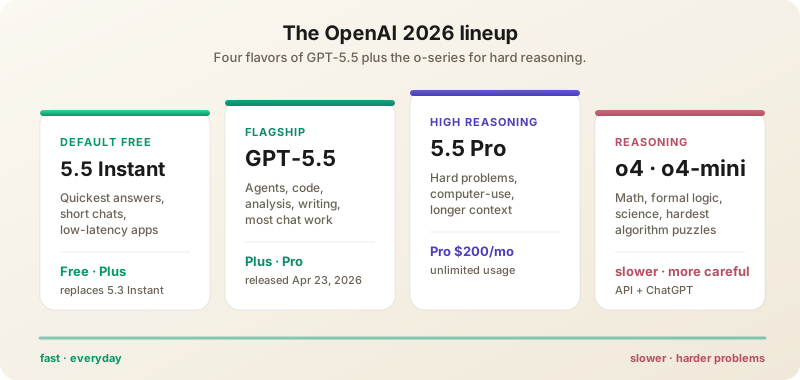
- GPT-6 Astra — Released September 3, 2026, from the largest training run OpenAI has ever done. A 1,050,000-token context window, 128,000-token maximum output, a knowledge cutoff of 30 April 2026, and five reasoning-effort levels (low, medium, high, xhigh, max). The headline capability is computer use; OpenAI's own framing is that it "can really do anything a human can do with a computer." It is also the first model ever rated Critical for cyber capability under OpenAI's Preparedness Framework, which is why the rollout is staged and cybersecurity tasks are restricted. See our launch coverage and full review.
- GPT-5.6 Sol — The value flagship, and still the right default for most paid work. Repriced to $4/$20 per million tokens when Astra shipped. A "Fast mode" option runs roughly 2.5x quicker at twice the price.
- GPT-5.6 Terra — Balanced tier at $2/$12. Good enough for the large middle of real work: drafting, summarising, routine code.
- GPT-5.6 Luna — Fast and very cheap at $0.20/$1.20, and the model behind unlimited text chat on the free plan. Ideal for classification, extraction and short-form generation at volume.
- GPT-5.6 Cyber — A restricted defensive-security model available through OpenAI's Daybreak program rather than to the general public. It is the model that found two Chrome zero-days in August.
- GPT-5.5 and earlier — Legacy. Still reachable in the API and under ChatGPT's legacy model picker, but no longer the recommendation for anything.
- Realtime and transcription family — gpt-realtime-2.1 and its mini variant power voice apps, gpt-realtime-translate does live interpretation, and gpt-live-transcribe and gpt-realtime-whisper handle streaming speech-to-text.
One thing to unlearn before you pick: the o-series is gone as a separate product line. Reasoning is now a dial on the main models rather than a different model, and o3 was dropped from ChatGPT's picker on 26 August 2026. If you were taught to "switch to o4 for maths," the 2026 equivalent is to raise the reasoning effort.
Astra is also not a clean sweep, and it is worth knowing where it isn't. On OpenAI's own published comparison it takes FrontierMath Tier 4 decisively — 97.6% against Claude Fable 5.1's 87.8% and Claude Opus 5's 73.2% — but loses Humanity's Last Exam to both, scoring 57.2% against 63.6% and 65.0%. Measured on price per finished task rather than price per token, it is not the cheapest route to frontier quality either; our model leaderboard tracks that, and the pricing calculator will do the arithmetic on your own token volumes.
Plans and Pricing (September 2026)
US prices, from openai.com/chatgpt/pricing. Local-currency pricing differs by market, and the Go tier in particular is localised.
- Free — Unlimited text chat on GPT-5.6 Luna, with limited uploads, image generation, voice, deep research and memory. Enough to try; not enough for daily work.
- Go ($8/month) — Added worldwide in January 2026 and easy to miss. More messages with tools, more uploads, more image creation and longer memory than Free. It does not unlock the advanced reasoning models. Free and Go are also the two tiers where OpenAI is testing ads; every paid tier above Go stays ad-free.
- Plus ($20/month) — The default subscription for individual professionals, and the tier this guide assumes. Advanced reasoning with GPT-6 Astra and GPT-5.6, expanded uploads and image creation, projects, scheduled tasks, custom GPTs, expanded Codex usage, early access to new features.
- Pro ($200/month) — 5x or 20x the usage of Plus, Pro-grade reasoning on Astra, maximum Codex tasks, unlimited and faster image creation, maximum memory and context. For people running agentic work all day.
- Business ($30/user/month) — Admin console, SAML SSO, shared GPTs, central billing, and content not used for training.
- Enterprise — Custom pricing: audit logs, dedicated capacity, data residency across a dozen regions, SCIM, enterprise key management.
- ChatGPT for Teachers — Free for verified U.S. K-12 educators through June 2027. ChatGPT Edu covers universities.
The number that actually decides whether a plan is usable is the context window, and it varies by tier far more than most people expect. For everyday (non-reasoning) chat the total window is 27K tokens on Free, 54K on Go and Plus, and 128K on Pro. For reasoning models it is 256K on Go and Plus, and 400K on Pro. The million-token figures quoted for Astra are API numbers — a Plus subscriber does not get a million-token chat window.
What GPT-6 Astra Changes
Truly Agentic Workflow Execution
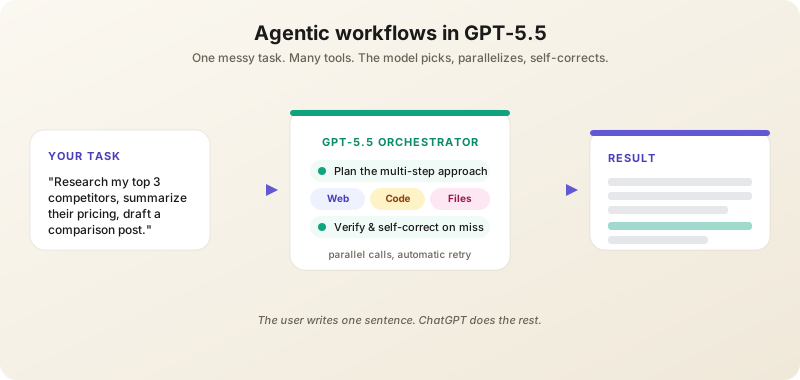
This is the headline feature. Give Astra a messy, multi-part task and it plans, uses tools, checks its own work, navigates ambiguity, and keeps going.
Examples that work today on Plus and above:
- "Research my top 3 competitors, summarize their pricing pages, and draft a comparison blog post."
- "Analyze this CSV, identify anomalies, and create a presentation explaining them."
- "Find the best laptops under $1,500 for video editing, compile reviews from the last 6 months, and recommend one with reasoning."
- "Book me a haircut on Tuesday afternoon near the office and confirm by email."
The model can use Web, Python (Advanced Data Analysis), file uploads, image generation, and — on Pro — direct computer control to complete these. Behind the scenes it picks tools, calls them in parallel where possible, and self-corrects when a step fails.
Computer Use
Astra navigates desktop and web applications. It clicks, types, scrolls and fills forms — OpenAI president Greg Brockman says it can "zip through spreadsheets, fill out forms, and navigate across web pages often at superhuman speed." Common uses: data entry across legacy systems, scraping a stubborn portal, repetitive expense reports, end-to-end booking flows. The agent shows what it is doing in a side panel and pauses for confirmation on consequential actions. This is the capability OpenAI leaned on when it started using the phrase "the AGI era" — and it is the one most worth testing sceptically on your own workflow before you trust it with one.
Reasoning Effort Is a Dial
Astra exposes five effort levels: low (the API default), medium, high, xhigh and max. Higher effort means the model thinks longer before answering, and the cost is real — at max effort it can take over five minutes to return a first token. Use low for everyday work, raise it when a wrong answer is expensive, and reserve max for problems you would otherwise hand to a specialist.
Better Code Execution
The Code Interpreter (now called "Advanced Data Analysis") is dramatically better at multi-file projects, debugging, and producing clean, well-tested output. It can install packages, manage virtual environments, and stream long-running jobs.
Stronger Scientific Reasoning
Astra takes Terminal-Bench-Science at 64.6% against 52.6% for GPT-5.6 Sol and 30.0% for Claude Opus 5, and OpenAI has been pushing the scientific-workflow angle hard — up to and including claiming a swarm of 10,000 agents produced a Navier-Stokes result. Treat the marquee claims as claims. What is reliably useful today is the ordinary work underneath them: literature review, hypothesis generation, experimental design, and catching subtle errors in a pre-print you are already reading closely.
Core Features in Depth
Image Generation (Native GPT Image)
ChatGPT can generate images conversationally. Specify what you want, then refine: "make her smile bigger", "change the lighting to sunset", "add a cat on the windowsill". Image generation is deeply integrated — no separate model selector needed, and it works on every tier including Free. If you are looking for DALL·E, it is gone: OpenAI retired the DALL·E GPT on 30 August 2026, having already pulled the dall-e-2 and dall-e-3 API snapshots in May. The feature you want is now simply called ChatGPT Images. Features that matter:
- Text rendering — Legible text inside images, including UI mockups, posters, and infographics.
- Editing & inpainting — Upload an image and ask ChatGPT to mask and modify a region. Replace a sky, remove a person, recolor a product.
- Style consistency — Reference a previous image in the conversation to keep characters, palettes, and aesthetics aligned across a series.
- Aspect ratios & sizes — Specify "vertical 9:16", "square 1024", or "wide 2048" to control output for downstream use.
Custom GPTs
Plus+ users can create specialized ChatGPTs preloaded with instructions, knowledge files, and tools. The GPT Store has thousands of community creations. Configuration is no-code: name it, describe its job, upload reference files, select which tools (browsing, code, image gen, custom actions) it can use.
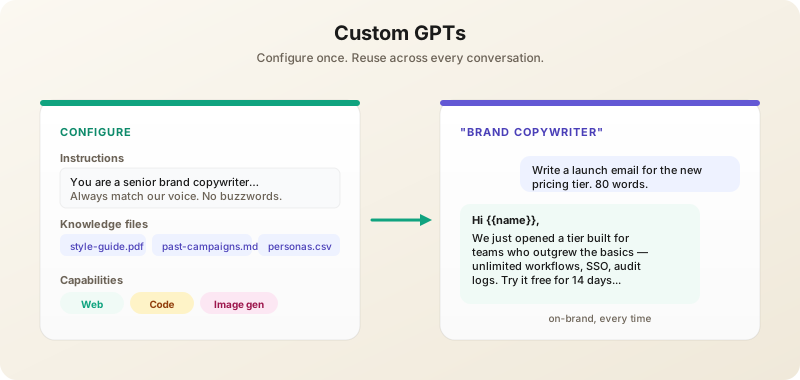
Examples that pay off in days:
- A writing coach that enforces your style guide.
- A coding assistant trained on your codebase docs and API conventions.
- A customer service agent built on your help center content.
- A onboarding buddy that answers new-hire HR questions from your handbook.
If you find yourself writing the same kind of prompt 10+ times, build a GPT.
Web Browsing
ChatGPT searches the live web, cites sources, and synthesizes findings. Particularly strong for current events, prices, recent research, and product comparisons. Set the model to "Browse" or just ask a recency-flavored question ("what's the latest on…") and it picks the right tool.
File Uploads
PDFs, Word docs, spreadsheets, images, code files, JSON, CSV. Upload and ask specific questions: "What are the three biggest financial risks in this 10-K?" "Find every column with PII and propose a hashing strategy." Up to ~512MB per file on Plus, more on Pro.
Voice Mode
Standard Voice (works on free) and Advanced Voice (Plus+) — natural conversations with low latency. Advanced Voice can now sing, switch tones mid-sentence, and even imitate accents. It also handles long uninterrupted listening — paste an article and ask it to read aloud, or have it dictate notes back to you. With GPT-Realtime-Translate, ChatGPT can simultaneously interpret between 70+ input languages and 13 output languages while keeping the speaker's pace.
Memory
ChatGPT can remember context across conversations. By default it remembers facts you tell it about yourself ("I'm a senior engineer focused on Postgres performance"). You can view, edit, or delete memories in Settings → Personalization → Memory. Memory is per-user and not shared across devices/accounts.
Canvas
A side-panel writing/coding workspace that opens when ChatGPT generates long content. Edit inline, ask for targeted revisions ("rewrite this paragraph more confidently"), and see version history. Replaces the awkward chat-and-copy loop for long-form work.
Effective Prompting in 2026
Treat It Like a Capable Junior Employee
The 2026 models are smart enough that overspecified prompts hurt. Don't manage every step. State the goal, the constraints, and the audience — let the model figure out the path. Save micromanagement for cases where it's failing.
Specify What "Good" Looks Like
"Write a sales email" gets generic output. "Write a sales email for a B2B SaaS targeting CFOs at mid-market manufacturing companies. Goal: book a demo. Constraint: under 150 words. Tone: confident but not pushy. Don't use 'revolutionary' or 'game-changing'." → usable draft.
Use Custom Instructions
Settings → Personalization → Custom Instructions. Tell ChatGPT once who you are, what you do, and how you like answers — applies to every chat:
I'm a senior software engineer focused on TypeScript/React.
I prefer concise answers with code examples.
Skip basics unless I ask. Don't pad with disclaimers.
Use markdown for structure.
This single setting changes every interaction. Five minutes to set up; pays back for years.
Iterate, Don't Reprompt
"Make it shorter", "More technical", "Less corporate", "Add an example with code" — all faster than starting fresh. ChatGPT's conversation memory is strong; use it.
For Hard Problems, Turn the Effort Up
The old advice was to switch to a reasoning model. In 2026 the move is to stay on the main model and raise the reasoning effort: quick questions on Luna, everyday work on Sol, and Astra at high or xhigh when the answer has to be right. Every ChatGPT tab has a model selector — pick deliberately rather than leaving it wherever it last landed.
For Repetitive Tasks, Build a GPT
Anything you'll do more than 10 times — log triage, vocab cards, weekly status reports — deserves its own custom GPT with locked-in instructions.
The OpenAI API
For builders, the API exposes everything ChatGPT can do plus more. Endpoint: https://api.openai.com/v1/responses (the modern unified endpoint) or chat/completions for legacy code.
Key API Capabilities
- Responses API — One endpoint for chat, tools, browsing, file search, image generation, and code interpreter.
- Tool use — JSON-schema-defined functions; supports parallel and forced tool calls.
- Structured outputs — Guarantees JSON conformance to a schema. Use this instead of "please return JSON" in the prompt.
- Batch API — 50% off list pricing for async jobs that can wait up to 24h. Great for backfills and evals.
- Fast mode — Renamed from Priority processing on 30 July 2026. Roughly 2.5x the speed at twice the token price, via
service_tier: "fast". - Fine-tuning — Useful when you have thousands of high-quality examples and a narrow domain. Check the current supported-model list before planning around it.
- Conversations API — The replacement for Assistants and Threads, which OpenAI shut down on 26 August 2026. If a tutorial tells you to create an Assistant, it is out of date; use the Responses and Conversations APIs.
Current per-million-token API prices, from OpenAI's pricing page: GPT-6 Astra $10 in / $50 out; GPT-5.6 Sol $4 / $20 (promotional at least through 21 November 2026); Terra $2 / $12; Luna $0.20 / $1.20. Prompts over 272K tokens bill at the long-context rate, which is double. Image generation runs on gpt-image-2.5-sunburst and gpt-image-2.5-flare.
The Codex CLI
OpenAI's answer to Claude Code. The Codex CLI runs in your terminal, edits your repo, and uses your selected model as its brain. Install with npm install -g @openai/codex. Codex usage is metered by plan — expanded on Plus, maximum on Pro — and there is a mobile Codex surface now as well. Many teams run both Codex and Claude Code side by side, picking per task.
Real-World Workflows by Role
For Marketers
- Campaign drafting — Custom GPT loaded with brand guidelines, recent campaigns, and the target persona. Daily use produces on-brand copy in seconds.
- Competitor analysis — Agent mode with a research prompt; ChatGPT browses, summarizes, and outputs a Markdown comparison table.
- Image generation for socials — Native image gen is fast enough for daily content; iterate in chat until the visual works.
For Operators & Analysts
- CSV/Excel analysis — Upload spreadsheet, ask for trends, outliers, and a chart. Advanced Data Analysis handles ~100MB files cleanly.
- Process automation — Pro tier computer-use agent fills out repetitive web forms, books vendors, scrapes lists.
- Status reports — Custom GPT that ingests this week's metrics and produces a 2-paragraph executive update in your house style.
For Developers
- Codex CLI for repo work — Multi-file refactors, test generation, migrations.
- API for product features — RAG, classification, customer chat — Responses API with structured outputs covers 80% of needs.
- High reasoning effort for hard problems — Algorithm design, formal verification, complex SQL. Slower and dearer per call, worth it when a wrong answer costs more than the tokens.
For Students & Researchers
- Study mode — Upload course notes and exam past papers; ChatGPT generates practice questions and tutors you through wrong answers.
- Literature surveys — Upload PDFs, ask for syntheses with citations. Verify before trusting; hallucinations on cited claims still happen.
- Voice study sessions — Advanced Voice can quiz you while you walk.
ChatGPT vs Claude vs Gemini (September 2026)
All three are excellent. Choose based on workflow:
- ChatGPT — Best for: image generation, agentic computer use, voice mode, the broadest GPT and app ecosystem, and the widest spread of price tiers, from $8 to $200.
- Claude — Best for: nuanced writing, code review, careful analysis, and anything where "I'm not sure" beats a confident invention. Opus 5 and Fable 5.1 both beat Astra on Humanity's Last Exam, and Claude still wins most blind writing comparisons.
- Gemini — Best for: Google Workspace users, and native video and audio understanding. Context is no longer its edge — Astra's 1.05M-token window matches Gemini's — but if your documents live in Drive, Gemini is the better fit.
Most professionals end up subscribing to two of the three: ChatGPT for image generation and voice, Claude for writing and code, Gemini for Workspace docs. If you want the numbers rather than the summary, our leaderboard ranks them on quality against cost per task, and the side-by-side comparison lays out the feature grid.
Privacy & Data Controls
By default, free and Plus conversations may be used to improve OpenAI models. Disable in Settings → Data Controls → Improve the model for everyone. Business, Enterprise, and API requests are not used for training by default. Temporary Chat mode (the icon in the top-right) keeps a conversation out of history and memory entirely — useful for sensitive content.
Common Mistakes to Avoid
- Using free tier for serious work — Plus at $20/month is dramatically more capable, and worth it within a single useful session. Don't stop at Go ($8) if you need the reasoning models; that is the line Go does not cross.
- Not using files — Pasting long text into chat is worse than uploading the file. Files get better attention and retrieval.
- Ignoring Custom Instructions — Spend 5 minutes setting them up. Pays back forever.
- Trusting outputs blindly — Always verify factual claims, citations, and numbers. ChatGPT still hallucinates, just less than before.
- Not using GPTs for repeat tasks — If you do the same kind of prompt 10+ times, build a custom GPT.
- Defaulting to the most expensive model — Luna and Terra handle most everyday tasks at a fraction of the cost. Astra at max effort is 50x Luna's output price and can take minutes to start answering.
- Confusing Memory with Custom Instructions — Memory is automatic facts the model picks up. Custom Instructions are rules you set explicitly. Both useful, different purposes.
What's Next
Three things are already in motion for late 2026. Advertising is arriving on the Free and Go tiers alongside an integrated ChatGPT Ads Manager. ChatGPT is pushing into regulated verticals — Health now connects to Epic's patient records, and the Pentagon has put it in front of three million personnel. And OpenAI keeps collapsing separately branded products into the main models: DALL·E, Sora's standalone app, the Assistants API and the o-series were all folded in or retired inside a single year.
That last pattern is the one to plan around. Anything you build on a specific product name is a migration waiting to happen, while the core skills — specific prompts, deliberate model selection, file workflows, custom GPTs — carry forward across every rename. If you would rather not read release notes, our AI news tracks each of these as it lands.
Want AI news before everyone else?
The morning's most important AI stories, straight to your inbox. No fluff.