
GitHub Copilot Review 2026: Is It Still Worth It?
GitHub Copilot is the broadest AI coding assistant and the only real option for JetBrains, Visual Studio, Neovim and Xcode, with completions still free. But June's move to metered AI Credits changed the maths, and Claude Code took developer ground.
Pros
- Only major option for JetBrains and Visual Studio and Xcode
- Understands your GitHub PRs and issues
- Code completions stay free and unlimited on every plan
- Model selection across Claude and GPT and Gemini and MAI
- Cheapest entry at $10/mo
- Genuinely usable free tier
- Most mature enterprise compliance and IP indemnification
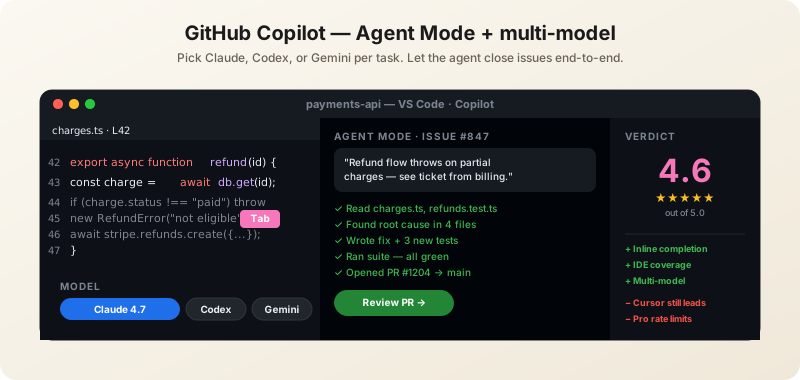
- Agent mode works in VS Code and JetBrains
Cons
- Lost developer ground to Claude Code
- Cursor still beats it on multi-file editing
- Metered AI Credits made the bill less predictable
- Codebase context weaker than Cursor
- Annual subscribers stuck on worse legacy multipliers
- Transition credits for Business and Enterprise expired in August
Updated September 8, 2026. The pricing table below was re-checked against GitHub's published plans. Correction: an earlier version said each paid plan includes credits equal to its price. GitHub now lists a base allotment plus a "flex" allotment — Pro's $10 includes 1,500 credits ($15 of usage), Pro+'s $39 includes 7,000 ($70) — and a $100 Max tier with 20,000 credits ($200) has been added. Business and Enterprise stay at 1,900 and 3,900 credits per seat. The hands-on assessment from August 2026 is unchanged.
The Bottom Line (August 2026)
GitHub Copilot is still the right default for most developers, and it is the only serious option if your editor is not VS Code. It runs in JetBrains, Visual Studio, Neovim and Xcode as well as VS Code, it understands your PRs and issues, and its Business and Enterprise tiers have no real competition on compliance. Inline completion remains the most stable in the category.
Two things changed since our May review, and both matter to a buyer. Billing was rebuilt in June — premium requests are gone, replaced by metered AI Credits — and Microsoft shipped its own coding model at Build, reducing Copilot's dependence on OpenAI and Anthropic. Meanwhile, by Microsoft's own reported internal assessment, Copilot has lost ground to Claude Code among developers.
Score: 4.6/5. The broadest and safest choice, no longer the most capable one.
This is the buying-decision review; pricing below is current as of August 2026. For workflow and setup, see our complete GitHub Copilot developer guide, and for the billing mechanics in full, our AI Credits explainer.
Is GitHub Copilot Still Worth It?
Yes — but for different reasons than a year ago. You are no longer buying the most capable coding AI. You are buying the one that works everywhere, understands your GitHub org, and passes procurement. For a great many teams, that is the more valuable proposition.
Buy it if any of these is true:
- Your editor is not VS Code. Copilot supports JetBrains, Visual Studio, Neovim and Xcode. Cursor supports none of them. For .NET teams and iOS developers this is decisive.
- Your work lives in GitHub. Asking Copilot Chat what was decided in an issue, or to summarise a PR, is genuinely useful and no competitor has that context.
- You need IP indemnification, content exclusions or SOC 2. The enterprise tiers are the most mature in the category.
Look elsewhere if you want raw capability: Cursor is faster on multi-file work, and Claude Code is far more autonomous on long jobs.
Pricing: What Changed in June 2026
This is the most important update in this review. On June 1, 2026, GitHub retired premium request units and moved to metered AI Credits, each worth a fixed $0.01. Every paid tier includes a monthly credit allowance made of a base allotment plus a smaller "flex" allotment (GitHub Docs, verified September 8, 2026):
| Plan | Price | Included credits | Notes |
|---|---|---|---|
| Free | $0 | None | 2,000 completions/month, 50 chat messages, basic models |
| Pro | $10/mo | 1,500 credits ($15: 1,000 base + 500 flex) | Premium model access, Agent mode |
| Pro+ | $39/mo | 7,000 credits ($70: 3,900 base + 3,100 flex) | Higher limits, priority on flagship reasoning models |
| Max | $100/mo | 20,000 credits ($200: 10,000 base + 10,000 flex) | Priority access to new models and features; for sustained high-volume agent work |
| Business | $19/user/mo | 1,900 credits per user ($19) | Org admin, content exclusions, SSO, IP indemnification |
| Enterprise | $39/user/mo | 3,900 credits per user ($39) | Custom knowledge bases, audit logs, fine-grained permissions |
The part that saves most developers money: code completions and Next Edit suggestions are not metered. They remain included and unlimited on every plan, including Free. What burns credits is chat, coding agents and multi-step model calls — the agentic work whose compute cost is what forced the change in the first place.
So if you live in autocomplete, your bill is your subscription and nothing more. If you run agents, the meter is running and model choice becomes a budgeting decision, since credits are drawn at each model's published per-token rate.
Two traps worth knowing. Annual Pro and Pro+ subscribers stay on the old premium request model until their term expires — but with higher model multipliers in the meantime, which is a worse deal than either scheme. And the enhanced transition credits that Business and Enterprise customers received for June through August 2026 have now expired, so from September the standard allowances apply.
What Shipped at Build 2026
Build 2026 was Microsoft's declaration of independence from its model suppliers, and Copilot was the vehicle:
- MAI-Code — a homegrown coding model for Copilot, part of a wider in-house MAI suite led by Mustafa Suleyman. The Information reported the plan the day before, framing it as a direct answer to Claude Code.
- MAI-Thinking-1 — Microsoft's first from-scratch reasoning model: a sparse Mixture-of-Experts design with 35B active parameters of roughly 1T total, and a 256K context window. Microsoft says human raters prefer it to Claude Sonnet 4.6 and that it matches Opus 4.6 on SWE-Bench Pro, trained with zero distillation on commercially licensed data.
- A GitHub Copilot desktop app — following Claude Code and Cursor out of the editor.
- Microsoft IQ — a context layer for agents, plus an agent-governance stack.
For a buyer, the strategic read matters more than any single benchmark: Microsoft is building the ability to serve Copilot without paying OpenAI or Anthropic. That should mean better pricing leverage over time. It also means the model behind your assistant may change under you.
Multi-Model Selection
Copilot still lets you pick which model handles each task, spanning the Claude, GPT and Codex, Gemini and o-series families — and now Microsoft's own MAI models. No competitor offers this breadth natively, and it remains Copilot's most underrated feature.
In practice: reach for a Claude model on nuanced refactors and code review, a GPT or Codex model for fast iteration, and Gemini when you need a very large context window. Under credit billing this choice now has a price attached, so the cheap-and-fast option is worth defaulting to for routine work.
The available roster shifts as labs ship; check the model picker rather than trusting any review's list, including this one.
Agent Mode and Autonomous Issue Resolution
Agent Mode works in both VS Code and JetBrains. Describe a task and Copilot reads files, plans changes, edits, runs tests, fixes errors and iterates:
- "Add a /trending API endpoint returning the top 10 articles by views, with Redis caching, 60s TTL"
- "Refactor all class components in src/components to functional with hooks, update tests"
Separately, you can assign a GitHub issue directly to Copilot and it will work in the background, opening a PR for review. For straightforward bugs and small features this works well. For anything needing real judgment, the PRs need substantial review — treat it as a junior contributor whose work you always read.
What Copilot Does Best
IDE Breadth
VS Code, JetBrains (IntelliJ, PyCharm, WebStorm, Rider), Visual Studio, Neovim, Xcode and GitHub web — all polished. This is the single strongest reason to choose Copilot, and it is a reason its competitors cannot answer.
GitHub Context
Copilot Chat understands your PRs, issues, commits and discussions. For teams already on GitHub this context is uniquely powerful and genuinely saves time in review.
Inline Completion
Still the most stable Tab experience available. Suggestions are fast and rarely need dismissing. After years of refinement GitHub has the latency-quality trade-off right — and this is the part that stayed free and unlimited under the new billing.
Code Review
Copilot's review gathers full project context before suggesting changes, and suggestions can be handed to the coding agent to generate fix PRs automatically.
Custom Instructions
Drop a .github/copilot-instructions.md in your repo and Copilot applies your conventions to every interaction. At parity with Cursor's rules system and a meaningful productivity win.
Where Copilot Falls Behind
It Has Lost Ground to Claude Code
Worth stating plainly, because it is the honest competitive picture rather than a reviewer's opinion: reporting on Microsoft's own strategy describes Copilot as having lost ground to Anthropic's Claude Code among developers, and that is what MAI-Code was built to answer. Copilot is playing catch-up on autonomy.
Multi-File Editing
Cursor's Composer remains the gold standard for changes spanning many files. Copilot's Edits improved but still feels like a follower; on a five-plus file refactor Cursor finishes faster with fewer mistakes.
Codebase Context
Cursor's @codebase semantic search surfaces more relevant context than Copilot's #codebase. Copilot sometimes misses obviously related code that Cursor finds immediately.
Cost Predictability
New this year. The old model gave you a fixed quota; the new one gives you a balance that drains at model-specific rates. For agent-heavy work that is harder to budget than Cursor's flat $20.
Copilot vs Cursor vs Claude Code
| GitHub Copilot | Cursor | Claude Code | |
|---|---|---|---|
| Editors | VS Code, JetBrains, Visual Studio, Neovim, Xcode | VS Code fork only | Terminal, any editor |
| Wins on | Editor breadth, GitHub context, enterprise compliance, model choice | Autocomplete, multi-file editing, iteration speed | Deep autonomy, parallel subagents, verification |
| Weakest at | Autonomy, multi-file work, cost predictability | Non-VS-Code editors, long unattended runs | Autocomplete, cost predictability |
| Entry price | $10/mo (free tier usable) | $20/mo flat | $20/mo, realistically $100+ |
| Billing shape | Subscription + metered credits | Flat | Subscription or metered API |
Read that table as three different bets rather than a ranking. Copilot is the safe institutional choice — it works in every editor your team already uses and your legal department will sign it. Cursor is the productivity pick for a VS Code shop. Claude Code is what you buy when you want to delegate whole jobs. Copilot is also the cheapest entry at $10, and its free tier is the only one of the three genuinely usable for light work.
Compare these side by side
Put the agentic coding tools against each other on pricing, autonomy and model choice in our interactive comparison.
Who Should Buy GitHub Copilot
Buy it if: your team uses editors other than VS Code; your work lives in GitHub issues and PRs; you need IP indemnification or SOC 2; you want the lowest entry price at $10; or you want to switch models per task.
Skip it if: you are a VS Code shop chasing maximum productivity — buy Cursor; you want an agent to own multi-hour jobs — buy Claude Code; or you need a bill that does not move with usage.
Which tier: the Free tier is a real trial rather than a token one. Pro at $10 is the value pick for individuals. Business at $19/user is about indemnification and content exclusions rather than capability. Enterprise at $39/user buys knowledge bases and audit logs.
Verdict
GitHub Copilot's position has shifted from leader to default, and that is not the insult it sounds like. It runs in editors its rivals cannot reach, it is the only one that knows your pull requests, and it is the one procurement will approve without a fight. At $10 a month it is also the cheapest way into serious AI coding assistance, with completions still free and unlimited.
What keeps it at 4.6 is that the frontier moved elsewhere. Cursor is better at multi-file editing, Claude Code is dramatically better at autonomous work, and Microsoft's own reported reading is that Copilot lost developer ground to Claude Code — which is why MAI-Code exists. The June billing change also traded a predictable quota for a balance that drains at model-specific rates. Buy Copilot for reach, compliance and price. Buy something else for depth. Score: 4.6/5.
Reviewed August 2026. Plan pricing and credit allowances as published by GitHub; benchmark claims are Microsoft's own published figures.
Frequently Asked Questions
How much does GitHub Copilot cost in 2026?
Copilot Free is $0 with 2,000 completions a month and limited chat and agent use. Pro is $10 per month, Pro+ is $39, Max is $100, Business is $19 per user and Enterprise is $39 per user. Since June 2026 each paid tier includes a metered AI Credit allowance at $0.01 per credit — a base allotment plus a "flex" allotment: 1,500 credits on Pro, 7,000 on Pro+, 20,000 on Max, and 1,900 or 3,900 per seat on Business and Enterprise (GitHub Docs, verified September 8, 2026).
Is GitHub Copilot still worth it?
Yes, if you value reach over raw capability. It is the only major option for JetBrains, Visual Studio, Neovim and Xcode users, it is the only one that understands your GitHub PRs and issues, and its enterprise tiers are the most mature. If you are a VS Code shop chasing maximum productivity, Cursor is better; for long autonomous jobs, Claude Code is better.
Is the free version of GitHub Copilot any good?
Unusually, yes. Copilot Free gives 2,000 completions and 50 chat messages a month with basic models, and inline completions are not metered under the new billing. It is the only genuinely usable free tier among the major coding assistants, though it has no AI Credit allowance so agentic work is off the table.
GitHub Copilot vs Cursor: which is better?
Cursor has better autocomplete, better multi-file editing through Composer and a flat $20 bill. Copilot works in far more editors, understands your GitHub context, has stronger enterprise compliance, starts at $10 and lets you switch models per task. If you work in VS Code, Cursor is the productivity upgrade. If you do not, Copilot is your only real option of the two.
Does GitHub Copilot use Claude or GPT?
Both, and more. Copilot offers model selection across the Claude, GPT and Codex, Gemini and o-series families, and since Build 2026 Microsoft's own MAI models as well. You choose per task, and under credit billing that choice affects cost because credits are drawn at each model's published per-token rate.
What is MAI-Code?
MAI-Code is Microsoft's homegrown coding model for GitHub Copilot, unveiled at Build 2026 as part of an in-house MAI model suite led by Mustafa Suleyman. It was reported as a direct answer to Anthropic's Claude Code, and reduces Copilot's dependence on OpenAI and Anthropic models.
Do code completions use AI Credits?
No. GitHub confirmed that code completions and Next Edit suggestions remain included in all plans and consume no AI Credits. Only chat, coding agents and multi-step model calls are metered against your credit balance.
Which editors does GitHub Copilot support?
VS Code, JetBrains IDEs including IntelliJ, PyCharm, WebStorm and Rider, Visual Studio, Neovim, Xcode and GitHub on the web. Since Build 2026 there is also a Copilot desktop app. This breadth is Copilot's strongest advantage over Cursor, which exists only as a VS Code fork.
About the score. 4.6/ 5 is BitsMinds' editorial verdict from our own testing and research — not an average of user ratings, which we do not collect. Prices and plan tiers are as published by the vendor on the fact-check date shown above. How we rate →
Related Reviews

Cursor IDE Review 2026: Worth $20 a Month?
Cursor Pro is $20 a month and Composer 2.5 now draws with Claude Opus 4.7 on coding benchmarks at roughly a tenth of the per-token cost. But SpaceX is buying Cursor, and that is now part of the decision.

Claude Code Review 2026: Pricing, Limits, Verdict
Claude Code is the deepest autonomous coding agent available, running Opus 4.8 at 88.6% on SWE-bench Verified with up to 1000 parallel subagents. Here is what it costs and where it falls short.

GLM-5.2 Review: Open Weights That Out-Code GPT-5.5
GLM-5.2 is the strongest open-weight coding model yet: MIT-licensed, 744B MoE, 1M context. It beats GPT-5.5 on SWE-bench Pro and trails Opus 4.8 by a point on FrontierSWE — at a fraction of the cost. Our review, with benchmark charts.
Want AI news before everyone else?
The morning's most important AI stories, straight to your inbox. No fluff.